Topics Discussed
- Introduction - The Checkout Panic
- 1. The Middleman Problem: TPAPs vs. PSPs
- 2. Automated Safety Flags & Circuit Breakers
- 3. Why Your Bank App (or Jupiter) Still Works
- 4. What to Do in an Emergency (The 10-Second Fix)
- 5. When Is the Bank TRULY Down?
- 6. Pro-Tip for Zero-Downtime: UPI Lite
- The Takeaway
- Frequently Asked Questions
Introduction - The Checkout Panic
Standing at a petrol pump with cars honking impatiently behind you, or at a grocery checkout with a growing queue, is the absolute worst time to see an error like: "Bank Server Down."
You check your balance, wonder if your account has been temporarily locked, or start checking your pockets for physical cash.
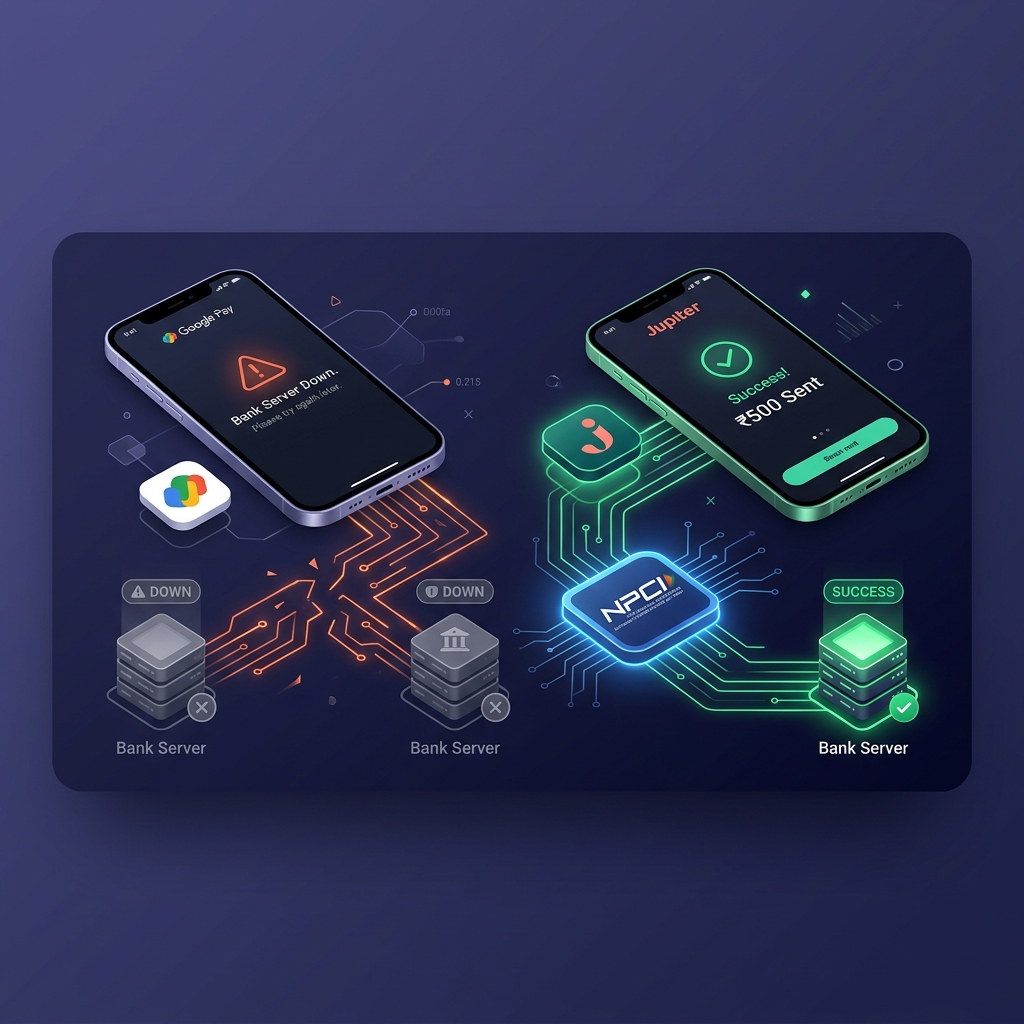
Here is what most people don't realize: In many cases, your bank server isn't down at all. Google Pay's specific route to your bank is just not passing through.
If you switch from Google Pay to your bank's native app or a direct neo-banking app (like Jupiter, iMobile, YONO, or BHIM), your payment will often process successfully in seconds. In this article, we discuss the technical architecture explaining why this happens, and how to keep yourself from having to face an awkward silence at the cashier.
1. The Middleman Problem: TPAPs vs. PSPs
To understand why Google Pay fails while your direct banking apps continue to work, you need to examine how the National Payments Corporation of India (NPCI) constructed the multi-tiered Unified Payments Interface (UPI) ecosystem.
UPI operates with two distinct primary types of applications:
- TPAPs (Third-Party Application Providers): Apps like Google Pay, PhonePe, and Paytm do not hold full banking licenses. They sit as front-end software interfaces built on top of traditional partner banks.
- PSP Banks (Payment Service Providers): Partner banks like Axis Bank, ICICI Bank, HDFC Bank, or Federal Bank that maintain direct API connections into the central NPCI switch network.
(Congestion Here = "Server Down")
When you initiate a payment using Google Pay, your transaction does not travel straight from your
phone to your destination bank account. Instead, it routes through Google Pay's partner PSP bank
servers first (indicated by handles such as @okaxis, @okhdfcbank, or
@okicici).
If the connection bridge between Google Pay's specific partner PSP gateway and your bank suffers high latency, traffic spikes, or a micro-outage, Google Pay loses communication with your bank's host. Rather than allowing your funds to become locked in a stressful "Pending" state, Google Pay triggers an automated fallback notice displaying: "Bank Server Down."
2. Automated Safety Flags & Circuit Breakers
Google Pay continuously monitors real-time transaction success rates across all bank handles. If failure rates spike on GPay's side for a specific bank (such as Federal Bank, SBI, or HDFC):
- Google Pay automatically deploys a circuit breaker algorithm.
- It proactively blocks new payment attempts for that bank handle.
- It flags the bank as unreachable to shield users from having money debited without immediate confirmation.
Meanwhile, alternative transaction pathways that haven't hit that strict failure rate threshold remain completely open and operational.
3. Why Your Bank App (or Jupiter) Still Works
When you open your bank's native application, or a direct digital banking platform like Jupiter (which operates directly via Federal Bank), you bypass Google Pay’s middleman servers entirely.
(Direct Pipeline = Success)
Here is why Jupiter UPI and native bank apps succeed where Google Pay fails:
- Dedicated Infrastructure Pipelines: Native banking apps utilize direct, dedicated API gateways straight into the bank's internal Core Banking System (CBS).
- Different PSP Gateway Routing: Jupiter uses its dedicated UPI integration
directly aligned with Federal Bank and its partner PSP stack (e.g.,
@jupiteraxis). It does not depend on Google's heavy intermediary handles. - Traffic Isolation: Even if Google Pay's partner servers are choked under millions of nationwide peak-hour API requests, your bank's native pipeline remains uncluttered and responsive.
4. What to Do in an Emergency (The 10-Second Fix)
The next time Google Pay or PhonePe throws a "Bank Server Down" error at a billing counter, do not panic, change payment methods unnecessarily, or step out of line. Follow this 3-step checklist:
| Step | Action | Why It Works |
|---|---|---|
| 1. Stay on screen | Keep the merchant's QR code visible or scan it directly inside your backup app. | Avoids asking the merchant to re-generate or re-print a dynamic QR code. |
| 2. Open Native App | Launch your bank's app (e.g., Jupiter, BHIM, YONO, iMobile, Axis Mobile). | Bypasses third-party app server congestion entirely. |
| 3. Authorize Payment | Enter the exact same 4-digit or 6-digit UPI PIN. | The underlying UPI PIN is encrypted and tied directly to your bank account, not to Google Pay. |
5. When Is the Bank TRULY Down?
Switching from Google Pay to Jupiter or a native bank app resolves transaction failures approximately 80% of the time. However, there are two specific scenario types where no UPI application will work:
- Core Banking System (CBS) Outages: If your bank's backend database undergoes scheduled night-time maintenance (typically between 1:00 AM and 3:00 AM) or suffers a complete infrastructure failure, payments will fail across all apps (Jupiter, GPay, PhonePe, and Paytm alike) because your core account balance cannot be debited.
- NPCI Core Network Downtime: If the central NPCI switch experiences a nationwide switch breakdown, the overall UPI network across India pauses.
6. Pro-Tip for Zero-Downtime: UPI Lite
To guarantee payments clear even during full bank maintenance windows, enable UPI Lite inside your preferred payment app.
UPI Lite maintains an on-device wallet balance (up to ₹2,000) for small-ticket daily transactions. Because UPI Lite transactions clear locally without sending real-time query calls to core banking servers, payments clear instantly with near 100% reliability.
The Takeaway
Google Pay and PhonePe are convenient aggregators, but relying on any single third-party app as your sole point of payment failure is a major operational vulnerability.
Keep your bank's native app or Jupiter setup, logged in, and accessible on your smartphone's home screen. The next time Google Pay claims your "Bank Server is Down," launch Jupiter or your native bank app, scan the code, and complete your purchase hassle-free.
Frequently Asked Questions
Google Pay is a Third-Party Application Provider (TPAP) that routes transactions through specific PSP partner bank servers. If congestion or latency occurs between Google Pay's specific PSP bridge and your bank, GPay triggers a circuit breaker error even if your bank's direct servers are online.
Yes, Jupiter UPI can continue working because Jupiter uses a dedicated, direct technical pipeline with Federal Bank and its partner PSP stack (e.g., @jupiteraxis), completely bypassing Google Pay's intermediary partner servers.
TPAPs (like Google Pay, PhonePe) do not hold banking licenses and build on top of partner banks. PSPs (Payment Service Providers) are direct banking institutions connected to the NPCI switch.
Keep the merchant's QR code scanned, open your bank's native app (or Jupiter, BHIM, YONO, iMobile), enter your standard UPI PIN, and authorize the payment. The underlying UPI PIN is tied to your account, not to Google Pay.
A bank is truly down during scheduled Core Banking System (CBS) maintenance (typically 1:00 AM to 3:00 AM) or a global NPCI core switch outage. In those cases, payments will fail across all apps.
UPI Lite stores up to ₹2,000 as on-device wallet funds and processes small transactions instantly without querying core banking database servers.